
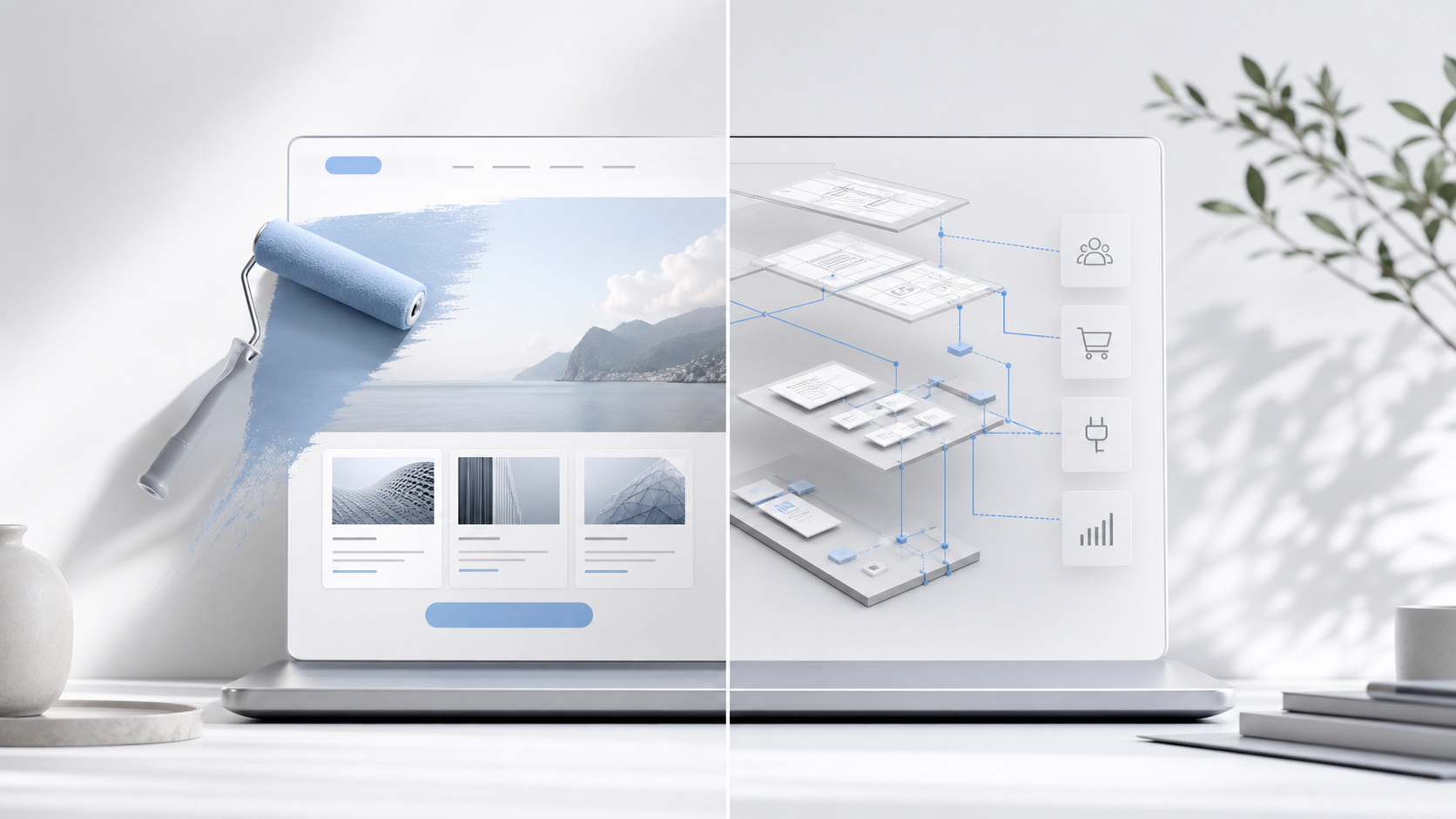
The difference between a website redesign and a complete rebuild is not how dramatic the finished site looks. It is how much of the underlying commercial system needs to change.
A redesign improves presentation within a foundation that still works. A rebuild changes the structure, content model, technology, conversion journey, integrations or measurement because the current foundation is limiting the business.
That distinction matters. Commissioning a rebuild when the platform is sound can waste budget and introduce unnecessary migration risk. Commissioning a redesign when the underlying system is failing can produce an expensive new surface over the same commercial problems.
This guide provides a practical way to choose between focused optimisation, a visual redesign and a complete website rebuild.
What is a website redesign?
A website redesign changes how the site communicates and presents the business while retaining most of its existing foundation.
The work may include a new visual identity, typography, page composition, image direction, content hierarchy, interface components and responsive styling. Selected copy may be rewritten and calls to action may be clarified, but the content management system, page relationships, URL structure, integrations and core templates remain broadly suitable.
A redesign is appropriate when the website is operationally healthy but visually or editorially behind the business. The team can already manage content. Service pages are organised sensibly. Forms reach the right place. Analytics can follow the important journey. The site simply no longer expresses the required level of quality, clarity or positioning.
This is more than changing colours. A useful redesign still requires customer-journey thinking, responsive design and careful quality assurance. The difference is that the work improves a sound system instead of replacing it.
What is a complete website rebuild?
A complete rebuild changes the website’s foundation as well as its presentation.
That may involve a new information architecture, revised service structure, different content types, new templates, cleaner code, a platform change, CRM integration, improved lead capture, analytics events, redirect mapping and a more maintainable publishing process.
The visible design is part of the project, but it is not the whole project. A rebuild is justified when several connected problems cannot be solved reliably inside the current structure.
For example, a homepage may appear to need a new layout. Deeper diagnosis may show that the real problems are vague service positioning, duplicated pages, proof that cannot be reused, forms with no qualification logic, mobile templates that omit important content and a CMS that requires developer help for routine edits. Redesigning the homepage would treat one symptom while preserving the causes.
If that sounds familiar, review the signs a business website needs rebuilding before deciding the scope.
The third option: optimise what already exists
The choice is not always redesign or rebuild. A commercially sound website may only need focused optimisation.
If one high-intent service page is underperforming, the right intervention might be a clearer proposition, better proof, a more useful call to action and improved measurement. If form completion is weak, the first step may be to remove unnecessary fields and clarify what happens after submission. If mobile performance is poor, image and script work may solve the issue without changing the entire platform.
Optimisation is the lowest-risk route when the problem is narrow, evidence can be collected and the existing system supports controlled changes. It also prevents a business from using a major project to avoid a decision that could be tested on one page.
Website redesign vs rebuild: the decision matrix
Assess the current site across six areas. One weak area may justify optimisation. Several connected weaknesses usually indicate a rebuild.
1. Positioning and service structure
Choose a redesign when the business proposition is already clear, the right services have dedicated pages and the navigation reflects how customers buy.
Choose a rebuild when the site still represents an older version of the business, profitable services are hidden, several offers compete on general pages or the navigation follows internal departments rather than customer decisions.
2. Content and page architecture
Choose a redesign when existing page types can support the new hierarchy, proof and editorial direction without extensive workarounds.
Choose a rebuild when every new page is copied manually, content is duplicated, reusable proof cannot be placed where it is needed or the CMS lacks structured fields for services, sectors, case studies and insights.
3. Mobile and accessibility
Choose a redesign when the responsive system is fundamentally sound and the main work is improving scale, spacing, hierarchy and interaction detail.
Investigate a rebuild when these problems are embedded across templates and cannot be corrected reliably within the existing foundation. A shared-template repair may still be sufficient. The WCAG 2.2 reflow criterion addresses content reflow without loss of information or functionality at a width equivalent to 320 CSS pixels for vertically scrolling content, except where two-dimensional layout is necessary.
4. Performance and technical quality
Choose a redesign when the site can be made faster through controlled image, font, CSS, JavaScript, caching or hosting improvements.
Choose a rebuild when performance problems are produced by the theme architecture, overlapping plugins, excessive scripts or code that cannot be changed safely. WordPress’s performance guidance identifies themes, plugins, image sizes, configuration and hosting as material factors; a new colour palette cannot correct an unsuitable technical stack. Use Core Web Vitals to check loading, responsiveness and visual stability alongside commercial journey evidence.
5. Lead capture, CRM and follow-up
Choose a redesign when forms already collect the right information, route it reliably and preserve source data for follow-up and measurement.
Choose a rebuild when every page ends with the same generic contact form, enquiries disappear into an inbox, confirmations set no expectation, CRM stages do not connect to the site or nobody can see which content produced a qualified opportunity.
This is often the decisive difference. A premium website should support the commercial process after the click, not stop at the form.
6. Search visibility and URL risk
Choose a redesign when useful URLs, content relationships, metadata controls and internal links can be retained.
Choose a rebuild when the service architecture must change, duplicate content needs consolidating or the current platform prevents a coherent search structure. This work needs a migration plan. Google’s site-move guidance covers URL mapping, testing, internal links, canonicals and sitemaps. Its redirect guidance recommends server-side permanent redirects where possible when a move is permanent.
A rebuild should never mean casually deleting the search equity and external links the existing site has already earned.
When retaining the current platform is sensible
Changing platform is not a mark of ambition. Retaining it is sensible when it can support the future operating model without fragile custom work.
Keep the current platform when:
- Editors can update services, proof and insights confidently.
- The theme or component system can support the new design cleanly.
- Required CRM, analytics and lead-capture integrations are reliable.
- Performance and accessibility issues can be corrected at template level.
- Security and software updates are maintainable.
- Existing URLs and content can remain stable.
- The internal team has the skills and ownership to operate it.
Platform familiarity also has value. A team that can publish and improve confidently may gain more from a well-planned redesign than from moving to unfamiliar software with a longer learning curve.
When retaining the platform creates false economy
Keeping the current platform becomes expensive when every requirement needs an exception.
Warning signs include page builders nested inside old themes, several plugins performing overlapping jobs, styling that depends on page-specific overrides, integrations maintained by manual exports and routine changes that require specialist support. The initial saving can be consumed by slow delivery, recurring breakages and an inability to improve the customer journey.
The relevant comparison is not the cost of migration against zero. It is the cost of a rebuild against the expected cost and constraint of preserving the existing system for the next several years.
The scope risks businesses underestimate
A redesign can quietly become a rebuild when content, functionality and migration requirements are discovered after visual work has started. A rebuild can also expand unnecessarily when every historic request is treated as a launch requirement.
Control the scope by answering these questions before design begins:
- Which services and customer journeys must the new site support?
- Which pages and URLs must be retained, consolidated or redirected?
- Which content can migrate as written, and which must be rewritten?
- What proof is available and where should it influence decisions?
- What information should forms collect, and where should it go?
- Which CRM, email, payment and analytics systems must connect?
- Who will publish, approve and maintain content after launch?
- Which performance, accessibility and browser checks define acceptance?
- What can be improved after launch instead of delaying it?
The premium website rebuild process should begin with these commercial and operational decisions, not with a preferred homepage style.
A practical recommendation for three common situations
The site works, but it looks behind the business
Start with a redesign. Preserve the platform and URLs, strengthen the hierarchy and proof, and test the full mobile experience. Confirm first that the dated appearance is not masking deeper service or conversion problems.
The site looks respectable, but produces weak enquiries
Start with diagnosis. A lack of enquiries may come from positioning, traffic quality, proof, calls to action, forms or follow-up. Read why business websites fail to generate enquiries and measure the real journey before approving a visual project.
The business, offer and operating model have changed
Plan a rebuild. Redefine the service structure, content system, proof, lead routes, CRM requirements and measurement together. Preserve valuable content and URLs through a controlled migration rather than copying the old site into a new theme.
Ask a prospective delivery partner to distinguish verified client outcomes from demonstrations and process descriptions. A polished example can explain a method; it does not prove a revenue result.
Decide the scope before commissioning the solution
The best choice is the smallest intervention that fixes the actual commercial problem without leaving a known structural constraint in place.
Choose optimisation for a narrow, measurable issue. Choose a redesign when the foundation works but the presentation and hierarchy need to catch up. Choose a rebuild when positioning, architecture, technology, conversion and operations need to change together.
Start with the £297 Acquisition Works Audit before commissioning implementation. This five-working-day diagnostic reviews the website-to-enquiry journey, follow-up, CRM and relevant workflows, producing prioritised actions and an implementation roadmap. It helps establish the appropriate scope instead of assuming a rebuild is necessary.
If you are not ready for a diagnostic, use the Business Website Conversion Checklist for an initial self-review.